
Regular readers will be aware of this ‘series’ (series probably isn’t the right word) where I photograph my desk about once every six months and talk about what’s on it, current software/hardware choices and habits. This series is more for me than you. I want to be able to look back on it one day and go, ‘wow, look how my desk has changed!’ Because, I am a nerd. Obviously.
This chronicling is something I enjoy very much and have noticed some trends already, as well as some returning hardware.
Anyway, here is the desk as of this morning, the ninth of May twenty twenty-six.

My desk has more on it than I would actually like; however, it’s quite utilitarian. No plants, no books, no trinkets.
Monitor: We have my old 34-inch Samsung ultra-wide making a return, this was sent to me by a friend, literally years ago. For a long time, it was on top of my wardrobe, but recently, I wanted a screen which wasn’t on my desk so I could watch movies while I draw.
There was a TV on that wall, but I got out my trusty drill and replaced it with the minitor which is screwed to the wall via a mounting plate. It’s a little higher than you would normally mount once, but I wanted it to be above the iPad when it is in my SketchBoard Pro drawing tray (more on that later.)
There is one USBC cable which comes from the monitor. It provides power as well as pictures (and sound, but the speakers are ‘meh’ so I mostly don’t use them)
Laptop: The laptop is still my 13-inch MacBook Air M2, with 1 TB of storage and 16 GB of Unified memory. I have been very tempted to replace it, but it’s more FOMO than need. In truth, if Vellum was available on iPad, I probably wouldn’t even need a laptop. I am just so used to having a ‘real’ computer that I keep telling myself it’s a requirement, when, in reality, I use my iPad quite a lot more than my laptop.
When it’s at the desk it stays closed, and I use it via that one single USBC cable which comes from my monitor.
Input devices: My keyboard is an Apple Magic Keyboard With number pad and Touch ID… That may be the least Apple product name ever. ☺️ It’s a thin membrane keyboard with Touch ID (the main reason I use it over others) and I have now used it for ages, I purchased it (used) on 26 Nov 2023. I think it may be the longest I have used a keyboard without the desire to switch.
In the photo, you can see my Magic Trackpad. I have a Magic Mouse too, and whichever one is currently on my desk is my favourite. I switch between them every few weeks. Usually when one needs charging, I switch to the other. I have no preference between them, they are both excellent input devices which only make sense on an Apple device. I think switching between them as I do is likely good for my wrist.
The mouse, I find, overall better for precision stuff like photo or video editing, while the trackpad is better for web browsing and general desktop stuff.
I have tried having both on the desk, but it just feels cluttered. If one broke I would just use the other, not sure if that is insightful, but I think it testifies to my lack of real preference. Both of these use Lightning connectors. These and the keyboard are the last non-USBC devices I own.
Audio: I got the AirPods Max headphones a few weeks ago when I was an interesting mix of annoyed that my Marshal Majors wasn’t charged and a little depressed. I strive for minimalism, but when I’m feeling a down, ordering new things really does cheer me up. I try not to let the urge create clutter, and I had been eyeballing the Max headphones ever since the version 2 was released.
Anyway, they are an absurd amount of money for ear speakers, but I basically live in headphones when I’m at my desk. They are, phenomenal! Though, I am sure there are better and cheaper choices out there. I am mostly using either my iPad or my MacBook and the way they magically switch, depending on which device I’m using, is fab, and it makes them the best devices for my needs (they were so expensive! I am not proud of how much I spent)
I also have AirPod 4 earbuds with ANC, those are my out of the house noisemakers, they come with me to work, gym and dog walks. I didn’t get the AirPods Pro’s because I don’t like the little rubber tips. They make my ears itchy. The non-pro’s have formed plastic tips which don’t penetrate your ear.
The final sound device I have isn’t in the picture. The other side of the room on a shelf is a DOSS Soundbox it’s a really nice bluetooth speaker with a good battery life and rich sound. I’m not an audiophile, but it sounds great to me.
iPad: The iPad is shown as being off to the side in this picture, which is where it is by default. I often pull it forward and use it like a laptop. Occasionally, I even plug the monitor into it because it’s so low effort to do. The Magic Keyboard which it ‘lives’ on has a power cable sticking out of it so it’s a convenient place to charge it. I use my iPad so much, I draw, read, write, watch things, make notes, use my Bible study app. It is most almost every task, my default device. I am constantly baffled by the ‘influencers’ 🤢 who constantly talk about having macOS on it or talk about how it’s not a useful device. I think it’s my favourite computer!
One of the things it does the most is sit in a SketchBoard Pro 2 in front of my monitor so I can draw while I watch a terrible movie. ☺️ Honestly, it spends lots of its time as canvas. As you have likely seen from my website, I’m not a good artist, but I find drawing relaxing, and I like to share things I make.
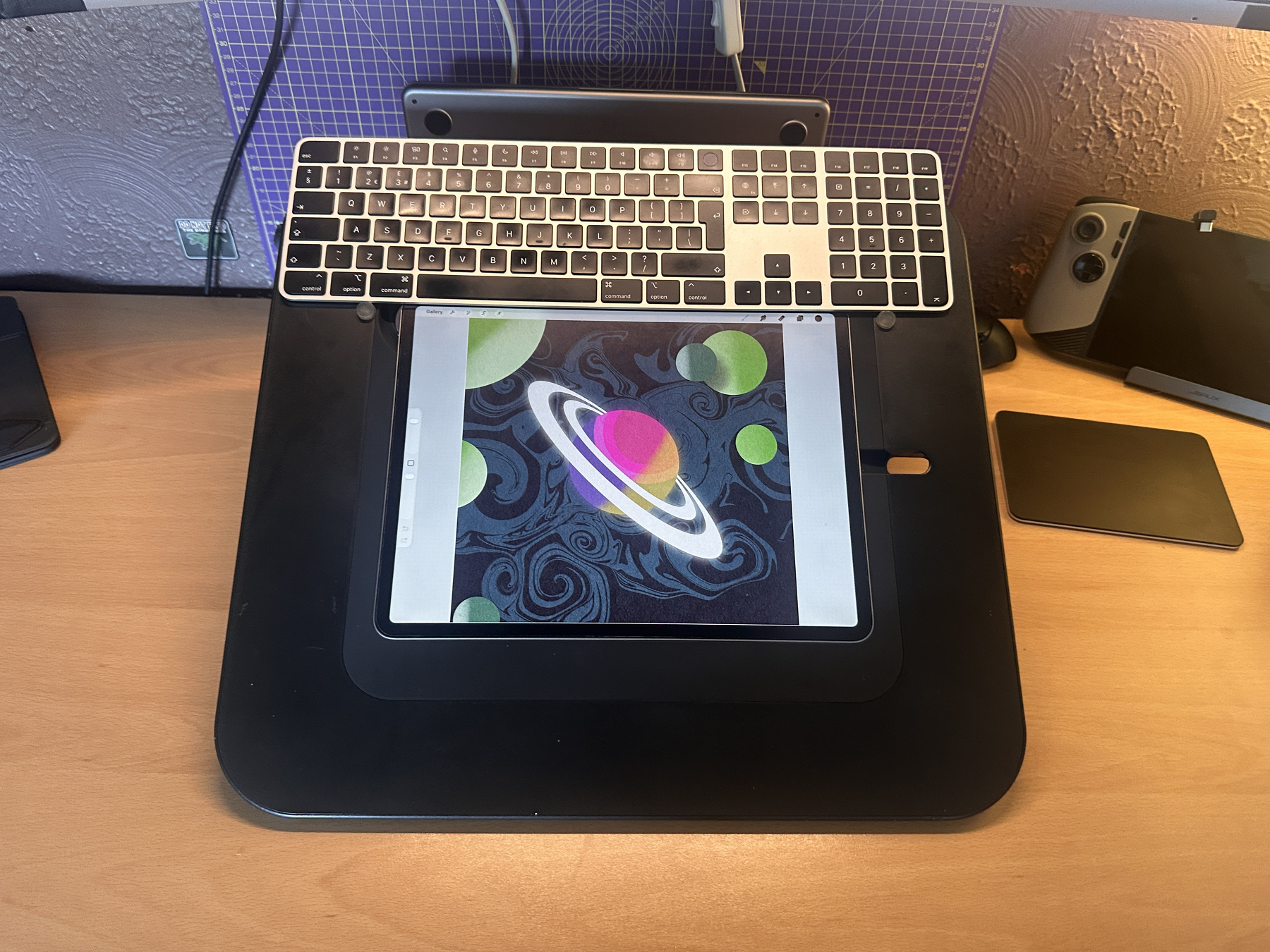
I’m a writer (not that you would know from this post) but I’m currently studying for a degree equivalent qualification, and it’s leaving the writing part of my brain fatigued, drawing has become a major pastime and creative outlet while I work through the course. I really want to finish one of the three stories I’m working on soon, but I think I need to wait until I have more emotional bandwidth.
The iPad itself is a 13-inch M2 with 512gb of storage. I really want an iPad Pro for the nano texture glass and increased RAM. Given that I mostly write and draw, I doubt I would notice higher CPU speed.
8bitDo Lever-less arcade controller: I am not the gamer I used to be, but maaaan, I love those side scrolling brawler games. This 8BitDo lever-less arcade controller is my preferred device for these games. I have one with a lever, but the thin profile and heavy build quality makes this one my goto. This is on my desk because I intend to play the Turtles Shredders revenge later. Also, it’s cool, so you should see it.
MSI Claw A8: While I don’t play much, not really. It’s just GuildWars 2 and old arcade games. I do this with my MSI Claw A8 (+AI Copilot) Which is a device with a stupid name. This thing though is a really nice handheld gaming computer. It has 32 GB of RAM, and an Intel CPU with integrated Arc Graphics. I often play it attached to my monitor, but it’s in a little dock to give me USB ports for my arcade controller and mouse dongle. I use a Logitech G502X mouse when I game and have a Logitech MX Keys leaning against the wall next to my desk. As much as I Love my Apple peripherals, they do not play nice with non-Apple hardware. To be honest, the Claw is on the list of devices I didn’t really need, but truly love. I upgraded it to a 2 TB NVME and have a 512 GB memory card in the top for little indie games. My internet at home is slow, so while I don’t play that many titles, I do like to keep a bunch installed so they are available if I do want them. Honestly, I adore GW2, and FFXIV. This enabled me to play them with minimum barriers.
Other stuff:
- Cup: I got it from John Lewis many years ago. While it’s very boring looking, it’s got the perfect handle shape. I love that cup.
- Pencil holder: When I draw, I like to have somewhere convenient to place down my Apple Pencil. This little block of wood with a hole in it was £3 from eBay. I stuck a little circle of rubber in the hole to stop it messing up the pencil tip. Works well. 10/10. It’s wood with a hole in it. I used double sided tape to stick it down.
- Kettle: That’s a temperature controller goose neck kettle with a ‘stay hot’ button. I like it. I use it with an AeroPress that lives on the shelf. Coffee good. Nom.
- Book, not on photo: The book which is currently living on my desk is The Incal by Jodorowski and Moebius. It’s a comic. I am both enjoying the story and basking the art.
- A fan: I have a battery powered fan. It charges by USBC and I put it on my desk when I am warm. I mentioned this here because it’s quite good. It came in two pack with a black one and a pink one. I like it way more than I expected for £14.
Software: Okay I’m going to write a whole post on this topic at some point, but, heres the rundown really quick.
- Writing - Ulysses
- Publishing - Vellum
- Drawing - Procreate (with RSCO and TGTS brushes)
- Pixel Art - Pixaki, with an honourable mention to Resprite.
- Animating - ToonSquid
- Photo editing - Pixelmator Pro (usually on iPad)
- Notes - Apple Notes (I use an app called Quick Capture to get stuff in there fast)
- Productivity suite - Apple Reminders, Apple Calendar. (Though I do use this app called Remind Me Faster to enter data into Reminders.)
- Bible Study - Logos and eSword, mostly Logos at this point.
- 3D work - Nomad, on the iPad.
- Media - AppleTV purchases, Nebula and YouTube (I don’t have a stand alone video player, not since I quit the open seas)
- News - I only use Apple News. Because everything else is bloat and doesn’t have retro gaming magazines ☺️
- Read later - Good Links
The road I have travelled: Here is a picture from the first instalment of this exciting series. Or, at least the oldest I could find.
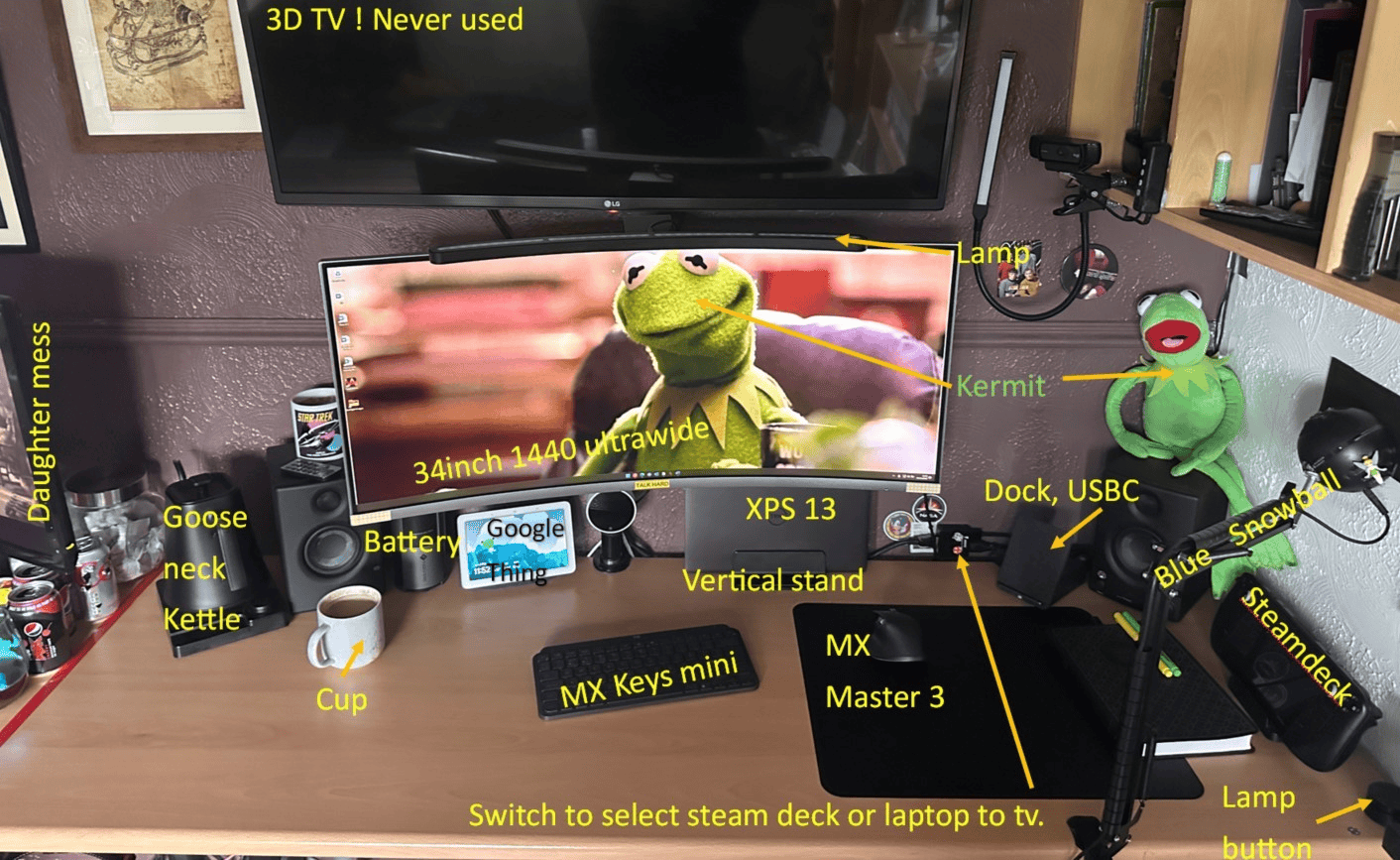
As you can see, we came a long way. No Steam Deck, no mic arm, no TV. Yet, I think some things have stayed. A laptop stand. That same monitor, and cup. Less Kermit this time, sadly. He lives proudly on the shelf the other side of the room. ☺️
I realise that in many ways I write these posts for myself, but I do hope you found it interesting.